Google

May 31, 2011

About SWTBot

I recently read a blog post about SWTBot, which I consider as a unfair rant.

Before going further, I would like to say that I think having several eclipse projects with the same functionalities is totally fine. Diversity and competition enable one to bring innovation and new approaches. I think it, but I have also experienced it inside the modeling platform with Acceleo, Jet and Xpand or Grafiti and GMF. That said I think each project should concentrate on building a successful technology and an enthusiast community associated, and not trying to claim that other projects suck, more over when criticisms seem a bit peremptory.

Below are my answers, point to point :
  • I agree that support for other keyboard mappings could be enhanced a lot in SWTBot, but I do not think this issue is a blocker for functional testing your application in a majority of cases. Seriously, how many features depends on umlaut and trema in your text inputs ?
  • You may prefer TestNG, but having support for this test framework is not mandatory for having SWTBot to work. However to complain about a feature request, never asked before, making SWTBot not usable, seems to me weird.
  • The comment above apply, but I will add that the issue you encounter seems to be rather in the scala eclipse integration plug-in than in SWTBot. Anyway it should be easy to fix.
  • I was not able to understand your problem and the what the trick you mention fixes. Please open an issue with steps to reproduce and the behavior you expect.
May be you were trying to suggest cool new features, or priority in fixing issues, in that case do not hesitate to open bugzilla entries or add your comment to existing ones.

SWTBot is a small project, with a dynamic community, which try to improve it step by step. It is certainly not perfect, had issues and room for improvement, but we try to make it work.

May 26, 2011

About modeling workbenches

I was last week at Cambridge for Code Generation 2011.

That's the first time I attend to this conference, and I feel I have missed for several years, agreat opportunity to discuss and share ideas about modeling beyond Eclipse community.

One hot topic of the conference was language workbenches with a competition dedicated to them one day before the official start. You will find several summaries on this first journey with the several presentations, including the Obeo Designer one. I really enjoyed this workshop and discovered interesting new workbenches such as Essential or Whole platform.

The day after I presented how you could create easily your own modeling workbench mixing several kind of editors. If you did not attend, following is a summary of my presentation.


I started by explaining why particularly graphical DSL are more interesting than UML if you want to raise your level of abstraction rather than level of complexity.

UML graphical notation, along being not specific, is ambiguous and not intuitive.


Building a graphical or textual DSL should be driven by end user way of work and data you model.

Neither expect from an emacs user to program by drawing some kind of diagram sequence, nor expect from a powerpoint user to create a flowchart by literally typing it.


One of a key point for a modeling workbench is its ability to support collaborative work, which means enable people with different concerns to work on the same models.

A modeling workbench should adapt to the workflow of users and set process with conflicts handling.


Modeling is valuable in itself, however you can reach another level of productivity gain when you use models to produce deliverables : code, documentation or settings file.

A modeling workbench should manage de- synchronization between models and the deliverables.


Obeo Designer is a modeling workbench platform which focus on adaptability, flexibility and tooling. It is based on eclipse modeling projects.
For instance for text generation it includes Acceleo, a template based approach generator with featured editor, debugger and profiler.


It includes also Viewpoint, a graphical runtime to specify graphical representations such as diagrams and table editors. You don't need to generate any line of code to specify representations.

Viewpoint provides several mechanisms to display only relevant informations such as layers and filters.


Live demo showed how to create such editors to edit graphically models and then did a model transformation from UML and a code generation to Java.


This platform has been used for several Obeo customers and partners with different kind of editors and with various generation use cases.

For instance for safety analysis with FTA diagrams.


Viewpoint technology is also capable of drawing advanced diagrams for your domain specific models such as sequences diagrams (including interaction uses and combined fragments).


Even if you should often avoid UML you may have to deal with such legacy models.

So we provide open-source UML editors you could easily extend or integrate in a descriptive manner.


If you want to know more, presentation slides are available online.

I attended to a lot of interesting talks, but if I should to retain only two, it would definitely be the keynotes from Terrence Parr and Ed Merks. Strong opinions, good sense of humor, and a understandable speech to explain what they have realized.

April 27, 2011

Obeo Designer @ Code generation 2011

I will be speaking at Code Generation 2011 about Obeo Designer, our DSL Studio based on top of Eclipse modeling technologies.


I will notably present several customer use cases of graphical workbench dedicated to end-users and how the platform flexibility and extensibility allowed us to overcome challenge we faced.


Process modeling


Temporal specifications modeling


Speaking about obeo designer, we are currently working on the next version, which will include following eclipse project versions :

On the Viewpoint side, we will use these technologies :
  • The viewpoint specification editor properties will be based on EEF
  • Acceleo 3 queries will be possible with completion and live validation


Acceleo 3 queries with live validation in EEF properties


March 23, 2011

Acceleo next version

For the next version of Acceleo included in Indigo, we are working on several items, following is a presentation of some of them.
  • Ant and maven easy integration


Currently you could easily use Acceleo as standalone, but if you need to integrate the acceleo compilation or generation in your workflow it's a bit difficult. So we are working on providing ant tasks and better maven support.


  • Documentation of your generators


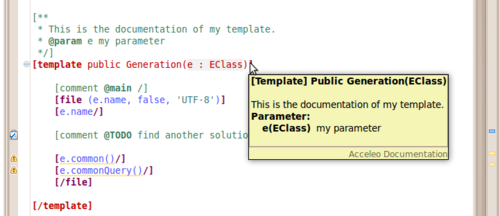
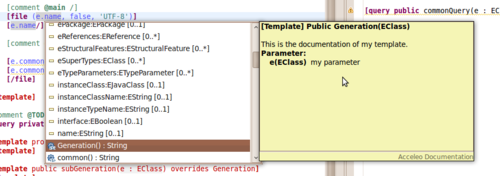
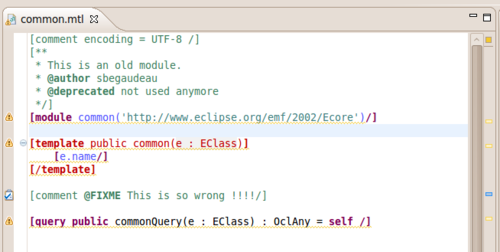
We add documentation capabilities for query, module and template. Documentation will be available on mouse over and during code completions. You have also support of deprecated tag with proper warning in case of use.

  • Improved performances


You will have the ability to compile modules as binary resources. It will reduce significantly the size of compiled modules and increase the performances. This serialization will be the default one, but it could be modified in the preferences.

By the way we organize a BoF this evening about Acceleo, come on to discuss with us !

March 16, 2011

GSoC 2011 @ Eclipse


This year again, Eclipse applied as a mentoring organization for Google Summer of Code. We already have been started to collect ideas, they could be contributed on the wiki.

Do not miss GSoC !

It's a great opportunity to see enhancements or new features added to your favorite projects. If you are a student, you should consider GSoC as an awesome chance to integrate free and open-source communities by doing (not only using), trust a former student. If you don't know how to get involved, have a look to our contribute page and keep an eye on the timeline.


Here are some ideas I added :


Acceleo has the ability to profile a generation. It creates a model containing the profiling data, and his able to display it. However it would be nice if we could export this model to a gprof file and reuse existing analysis tools such as the view from the linux tools project.


Thanks to its discovery UI modeling package users could very easily discover and install modeling components. However we miss an updated reference example to see how to use together all this technologies.


EMF Serialization is extensible and Protocol Buffers is an efficient serialization technology so it could be interesting to see how to combine them.


March 11, 2011

Graphical modeling @ EclipseCon 2011

If your read this blog entry, you probably already heard about EMF, but you may still wondering how modeling and all this meta stuffs could help you in your daily developer work.


If you are in this case, then you have to attend to the EMF tutorial for at the next EclipseCon. In the first part you will have time to discover the basics of EMF on a case sudy. In the second part you will have an overview of additional powerful technologies, such as EEF and GMF, 2 projects I will present related to being able to create and modify a model in a graphical manner.


EEF is a tool which enables one to generate sexy properties, but not only. It's a framework, which could be use to generate several kinds of user interface to edit your model.

It has been designed to be compatible with validation and transaction existing EMF components. Let's have a look to to see how you could easily generate an eclipse form editor in one click from your metamodel.


Even EEF if is a quite young project, it is already used in the industry and arouses interest with frequent questions on the newsgroup.

By the way EEF has been nominated and is finalist for the eclipse community award 2001 in the most innovative project category.


GMF is a project dedicated to the creation of diagram editors. It is split in 2 components, the runtime and the tooling.

The runtime connects GEF and EMF. It plugs your EMF model as the model in the GEF model-view-controler architecture and provides a diagram metamodel.

The tooling enables you to generate an editor based on the runtime.


The runtime has been designed for extensibility, you could extend it or redefine some parts very simply.

The tooling uses code templates, that you could extend to generate custom code. This enables you to keep your GMF models and the generated code always synchronized.

That's all for this EEF and GMF preview, if you want to know more, come to the tutorial !

February 16, 2011

Obeo new modeling box is coming

At Obeo we are currently working hard for the finishing of the next version of our eclipse based modeling studio named Obeo Designer.


Obeo Designer 5.0 embeds our latest modeling technologies.
  • Acceleo 3.0.2
Acceleo is a text generation tool. If you think that code generation sucks due to its lack of tooling, then you should probably try Acceleo. Its offers much more than a complete eclipse editor with syntactic coloration, code completion and quick fixes. For instance it provides an integrated debugger :

Acceleo debugger

Acceleo is a technology that has been recognized as innovative and effective.

Best open-source eclipse-based developer tool awardOpen innovation award


  • Obeo Traceability 2.0
Obeo Traceability is a tool to manage the synchronization between your models and the generated text. For each model element, you are able to know which text section have been generated and navigate between text and model. If you decide to modify the generated text, Obeo Traceability will automatically indicates it, and offers you the choice mark the section as not generated or to update model and generator.


Before modification on the left and after on the right

Obeo Traceability provide these features with a user interface completely integrated to Eclipse.

  • Viewpoint 5.2
Viewpoint allows one to create easily graphical editors. Easily ? For each editor you simply define mappings between model elements and graphical styles along with tools which describe modifications to make on model in response to user actions. Graphical editors ? you could specify diagrams, tables and trees and the API allows you to define your own kind of editors.
See example editors below made with Viewpoint.

Diagram editor

Table editor